

Usage insights: see what customers ask and where your AI chatbot needs help
Usage insights show what your customers ask, how many chats the assistant resolves on its own, and exactly which questions it could not answer, so you always know what to add next. They are included on every plan, Free included.

What does the dashboard show?
| Insight | What it tells you |
|---|---|
| Conversations and resolved chats | Weekly or monthly charts of conversations and of those the assistant resolved without your team |
| Handoffs | How many chats needed a person, compared with the previous period |
| Customer rating | The average score out of 5 from website chat ratings |
| Plan usage | Conversations, AI credits and storage used against your plan |
| Suggestions | Next steps such as chats waiting for a person, answers to teach or low-rated chats to review |
Improve answers: turn gaps into knowledge
Improve answers lists every question from the last 30 days that the assistant:
- handed to your team,
- was unsure about,
- had no knowledge for, or
- your team marked not helpful.
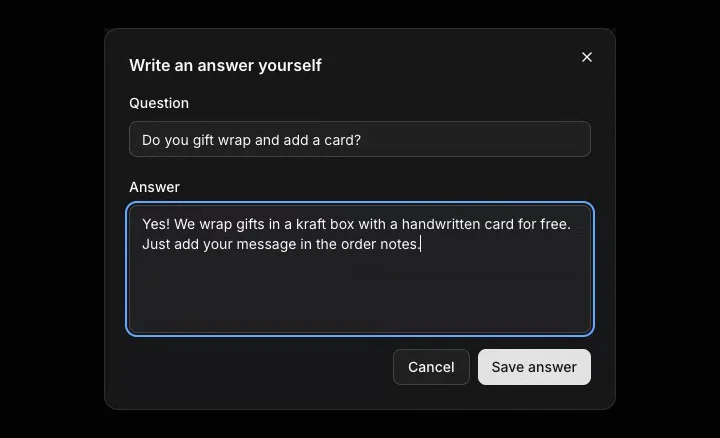
Each question shows the reason, how many times it was asked, when it was last asked and what the assistant said. Write the answer right there and it is saved to your knowledge, so the assistant uses it next time. If a question needs no answer, dismiss it.
Alerts before you hit a limit
You get an email and an in-app alert when usage reaches 80% and 100% of your plan and when the AI budget runs low, so answers never stop without warning.
A weekly routine that works
- Open Improve answers and write answers for the most-asked questions first.
- Review chats with low ratings and fix the knowledge behind them.
- Check that handoffs go down week by week.
- Try the new answers in private preview.
Fewer gaps means fewer handoffs, and your team spends its time on the chats that really need a person. Honest handoff explains what happens to a question the assistant cannot answer, and store knowledge covers every way to add the missing answer.
Frequently asked questions
Are insights included on the Free plan?
Yes. Insights and Improve answers are included on every plan.
How far back does Improve answers go?
It lists questions from the last 30 days, with how many times each was asked and when it was last asked.
Where do customer ratings come from?
From the satisfaction rating customers give at the end of a website chat. The dashboard shows the average out of 5 and how many ratings it is based on.
Can I hide a question that needs no answer?
Yes. Dismiss removes it from the Improve answers list.