

Honest handoff: an AI chatbot that says when it does not know
Honest handoff means that when the assistant is not sure of an answer, or a customer asks for a person, it says so plainly and passes the conversation to your team instead of guessing. You get an alert, reply from one shared inbox, and the assistant takes over again when you are done.

A wrong answer about a refund, a delivery date or a price costs more than a short wait for a person. Honest handoff is built around that: the assistant answers only from your own knowledge, and anything outside it goes to your team.
When does the assistant hand a chat to your team?
You pick the rule in the assistant settings:
| Rule | What happens | Good for |
|---|---|---|
| Whenever the assistant is unsure (default) | It says it does not have that information and hands the chat over | Most stores, especially where accuracy matters |
| Only when the customer asks for a person | It hands over when someone asks for a human | Stores with complete knowledge and a small team |
| Never | It asks the customer to contact the store another way | Stores with no one to take over chats |
The chat also goes to your team when the assistant cannot reply at all: when the AI model fails, when your plan's message limit or AI budget runs out, or when a message cannot be read.
What does the customer see?
- The customer asks something your knowledge does not cover, such as "Can I return this after 90 days?"
- The assistant replies that it is not certain and that it is passing the question to the store team; it never makes up a policy.
- The chat shows as waiting for a person in your inbox, and the assistant stays quiet while your team handles it.
- When your team is done, the assistant picks the chat up again.
How is your team alerted?
- Email, on by default, to your account email or another address you enter.
- In-app alerts in the dashboard.
- Alerts cover a customer waiting for a person, a customer ready to buy, a new booking request, usage at 80% and 100% of your plan, and a low AI budget.
- You choose how long a customer waits before the alert goes out, under Settings, Alerts.
Reply from one shared inbox
Handed-off chats from every channel arrive in the same inbox, with live updates. Your team can assign a chat, add tags and internal notes, snooze it, act on several chats at once and reply with saved replies. You can download a transcript, and follow up by email with a website visitor who left before you replied. Phone numbers and emails customers share are picked up into their contact, with tags, notes and history.
Handing the chat back to the assistant
The assistant takes over again automatically 15, 30, 60 or 240 minutes after your team's last reply; 30 minutes is the default. You can also switch automatic hand-back off and return each chat yourself.
Turn every handoff into an answer
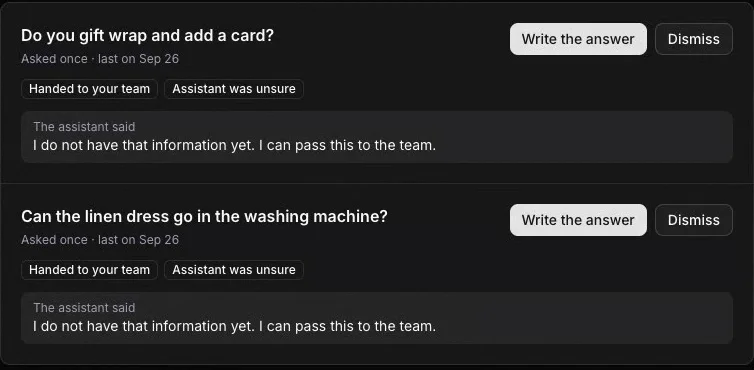
Every question the assistant could not settle appears under Improve answers, with how often it was asked and why it was handed off. Write the answer once and it joins your knowledge, so the next customer gets it straight away. Usage insights shows the full picture, and the handoff setup guide walks through each setting step by step.
Frequently asked questions
Does the customer know the chat went to a person?
Yes. The assistant tells the customer the question has gone to the store team instead of inventing an answer. On the website widget, your away message tells them when someone will reply outside business hours.
Can I switch handoff off?
Yes, by choosing Never. The assistant then asks customers who need a person to contact the store another way, so keep your phone number or email in your knowledge. The setup shows a warning when you switch it off.
When does the assistant start answering again?
15, 30, 60 or 240 minutes after your team's last reply, with 30 minutes as the default. You can also switch automatic hand-back off and return each chat yourself.
Does the assistant stop answering outside business hours?
No. Business hours only switch the website widget to Away and show your away message. The assistant keeps answering from your knowledge, and questions that need a person wait for your team.